
Museum donation kiosks that turn foot traffic into supporters.
Thousands walk through your museum, zoo, or attraction, and few carry cash. A donation kiosk at the exit lets them support what they just experienced with a card or phone tap.
 One ledger
Capture the feeling before the parking lot
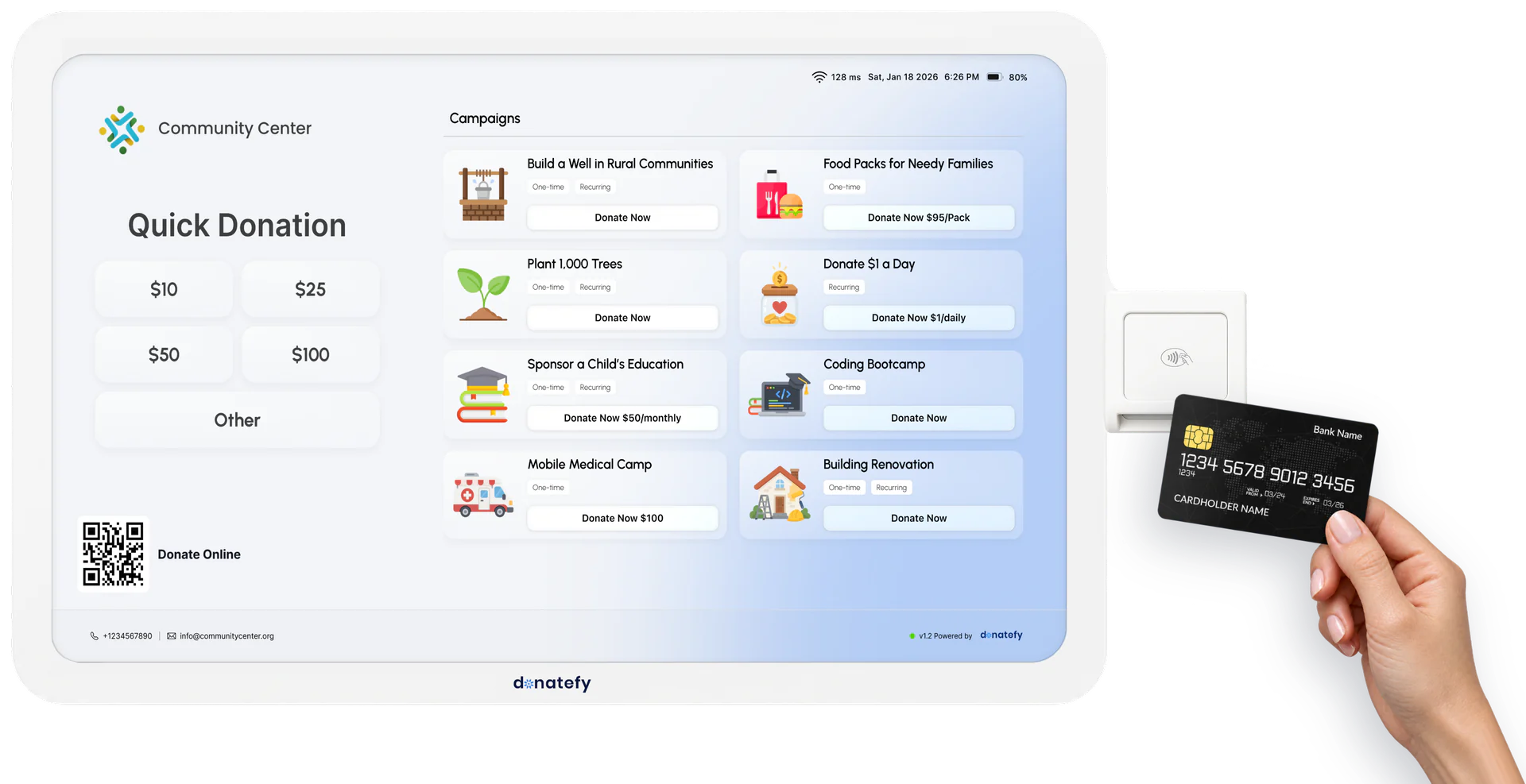
A museum donation kiosk is a self-service giving station at an entrance, an exhibit exit, or the gift-shop queue that takes a card or phone tap in seconds. Donatefy's FS-22 and WM-22 kiosks show Quick Donation presets tuned to visitor giving and campaign cards for what visitors just saw, take credit cards, debit cards, and digital wallets on an integrated tap and chip card reader, and send receipts automatically.
- Quick Donation presets for fast visitor gifts
- Campaign cards per exhibit, program, or animal
- One-time or recurring, receipted automatically
Where to place a museum donation kiosk
Put the kiosk where visitors pause and decide, at eye level, with a clear line of approach and a short sign beside it that says what the gift does.
The entrance
Where a free-admission museum makes its suggested donation. Visitors see the ask and the amounts before they go in, and a card or phone tap completes the gift in seconds.
The exhibit exit
Where the feeling is strongest. A campaign card for the gallery, habitat, or collection visitors just saw turns the moment into a gift on the way out.
The gift-shop queue
Where visitors are already standing still with a card or phone in hand. A kiosk beside the line gives them a way to support the museum while they wait.
Pick the format by the space: the WM-22 wall-mounted kiosk where floor space and sightlines are precious, or the FS-22 floor-standing kiosk when you want to move it as exhibits change. The placement playbook covers lobbies, entrances, and event halls in more detail.
Suggested donations at free-admission museums
When admission is free, the entrance kiosk is where you make the ask. Set Quick Donation presets as the suggested amounts for each campaign in the Admin Portal, change them from a desk without touching the device, and let visitors choose their own amount when a campaign allows it.
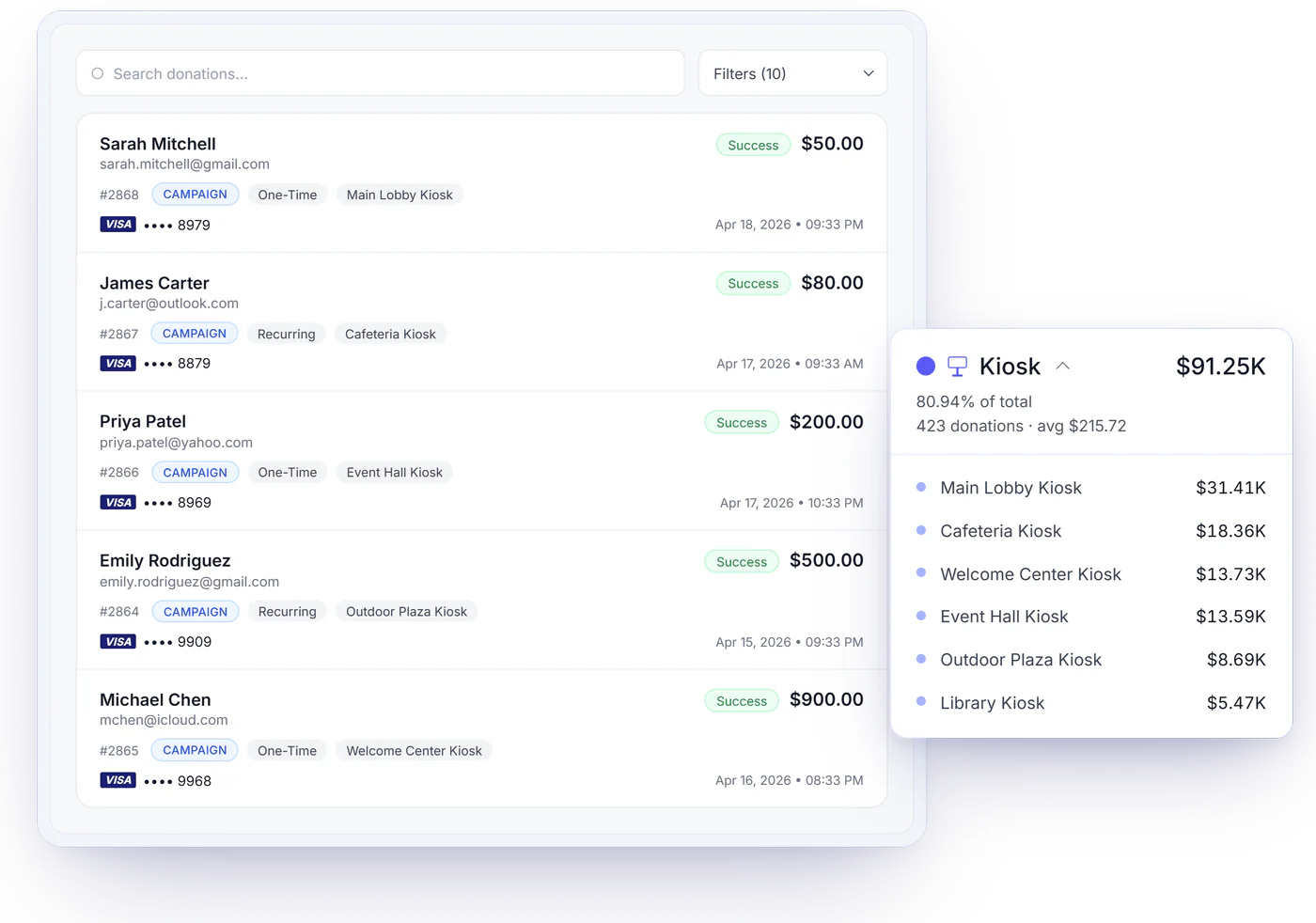
Every gift lands in the ledger tagged with the kiosk it came from, and on Growth and Enterprise the fleet dashboard shows totals per device, so you can compare the entrance with the exhibit exit and adjust the presets.
Keep the donation box for visitors who carry cash, and let the kiosk add cards, phone taps, and receipts for everyone else, as our post on whether a donation kiosk is worth it explains.

A kiosk your ops team does not babysit
Purpose-built hardware in a fixed enclosure, visible from the Admin Portal, supported remotely by Donatefy.
Status you can check
Device status, reader connection, and recent activity in the portal, so a quiet kiosk is a notification, not a surprise.
Remote support
Setup assistance and troubleshooting handled remotely, without a staff member standing at the device.
Totals per device
On Growth and Enterprise, the fleet dashboard shows what the entrance kiosk raised versus the exhibit-floor kiosk, and which campaigns pulled.
Zoos, aquariums, gardens, and historic sites
Any venue where visitors walk a route works the same way: a campaign card for each animal, habitat, garden, or restoration, shown on the kiosk nearest it, with every gift in one ledger.
- The FS-22 floor-standing kiosk on battery backup for up to 8 hours, for seasonal exhibits and spaces without a handy outlet
- The WM-22 wall-mounted kiosk at fixed exits and visitor centers, where it uses no floor space
- The Stripe Reader S700 and Stripe Reader S710, made by Stripe and provisioned by Donatefy, for gala nights and member events
Compare kiosks, readers, and phones for in-person fundraising.
Members, galas, and campaigns in the same ledger
The kiosk is the front door; the platform is the rest of the house. Online campaigns with goal meters for restorations and programs, handheld readers for gala nights, QR codes on signage, and recurring membership-style support, all landing in one ledger your finance office reconciles in minutes.
Across every organization on Donatefy
Museum donation kiosk questions
Comparing hardware? Read how to choose a donation kiosk.
Where should a museum put a donation kiosk?
Can the kiosk suggest a donation amount at a free museum?
Can visitors give monthly at the kiosk?
Can we move a kiosk for a seasonal exhibit?
Can we theme campaigns to exhibits?
Floor-standing or wall-mounted for a gallery?
How do kiosk gifts reach our accounting system?
How much does a museum donation kiosk cost?
Does a kiosk need staff to run it?
Map your visitor flow to giving points.
We will help you pick placements and campaigns for your spaces.