
Mosque donation kiosks for zakat, sadaqah, and every Jumu'ah.
A masjid donation kiosk takes a card or phone tap on the way out of the prayer hall, so worshippers who no longer carry cash can still give. Donatefy keeps zakat, sadaqah, and the building fund apart, sends receipts automatically, and puts the kiosk, online giving, and QR codes in one ledger.
 One ledger
What a masjid donation kiosk does
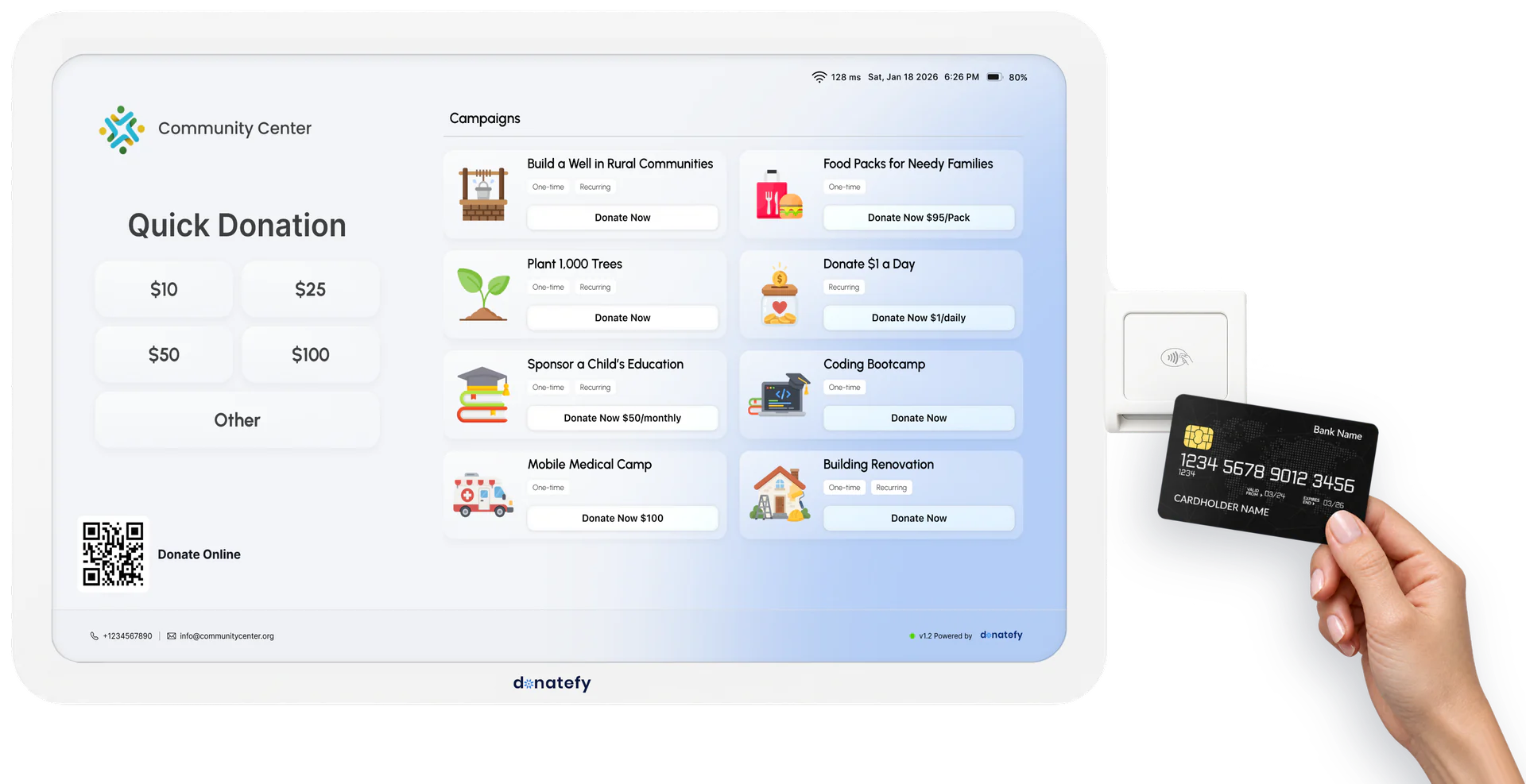
Think of a masjid donation kiosk as the donation box by the door, rebuilt for worshippers who carry a card instead of cash. On the way out of the prayer hall, a worshipper picks zakat, sadaqah, or the building fund, chooses an amount, and taps a card or phone, and the gift is booked to that fund before they reach their shoes. Your masjid buys a WM-22 wall-mounted kiosk or an FS-22 floor-standing kiosk once and owns it; both are 22-inch Donatefy donation kiosks.
- Campaign cards for the general fund, zakat, sadaqah, the building fund, and education
- Quick Donation amounts set for Jumu'ah, or any amount the donor enters
- Credit cards, debit cards, and digital wallets
- Optional fee coverage, so the masjid keeps 100% of the gift
- Anonymous by default, so sadaqah can stay concealed, with a QR code for anyone who wants a receipt
Watch a gift go from tap to ledger
The donor picks a fund and an amount and taps a card, and the gift appears in the Admin Portal with its campaign attached.
Recorded from the FS-22 giving flow beside the Admin Portal. Amounts shown are examples.
Organizations collecting with Donatefy








Keep zakat, sadaqah, and the building fund apart
Each fund runs as its own campaign with its own accounting coding, whether the gift came from the kiosk, a QR code, or the website. Your scholars and board decide what qualifies for zakat; Donatefy keeps every fund apart in the books.
Zakat
Its own campaign, so zakat reports and posts to your books apart from the general fund. On Enterprise, a campaign can also settle to its own Stripe account, such as a restricted zakat account.
Sadaqah and the general fund
Everyday sadaqah, the running costs of the masjid, and named projects such as a food pantry, each as its own campaign card the donor chooses on screen.
Building and education funds
A construction or expansion campaign with its own page and goal progress online, and the same fund waiting on the kiosk after Jumu'ah.
Seasonal funds such as zakat al-fitr or fidya can run as their own campaigns too, and each kiosk shows only the campaigns you assign to it.
Jumu'ah, Ramadan, and Eid giving
Masjid giving follows the calendar. The kiosk covers the walk out after prayer; QR codes, online giving, and handhelds cover the prayer hall, the iftar table, and the Eid grounds.
Jumu'ah
The whole congregation leaves within minutes. A kiosk on the way out, with Quick Donation amounts set for Friday, takes a gift in a few taps without holding up the line.
Ramadan nights
During the appeal after taraweeh, put each fund's QR code on the screen behind the speaker so people give from where they sit. Unit-based giving ties an amount to an outcome, such as sponsoring iftar meals.
Volunteers in the hall
At a fundraising dinner, volunteers work the room with the Mobile App on the phones they already carry, using Tap to Pay on iPhone and Tap to Pay on Android.
Eid prayers off-site
When Eid prayers move to a park or a rented hall, the building's Wi-Fi stays behind. The Stripe Reader S710, made by Stripe and provisioned by Donatefy, adds 4G LTE so volunteers keep taking gifts.
S710 cellular is billed by Stripe, separately from Donatefy: $10 per reader for each month cellular is on, at the rate Stripe publishes. Cellular is off by default and switched on only for the readers that need it.
Where to place a donation kiosk in a masjid
Put the kiosk where worshippers pass on their way out, never where it interrupts prayer, and angle the screen away from the prayer hall and foot traffic. Concealed sadaqah is prized, and a giver should feel unobserved.
Upstream of the exit
After Jumu'ah the congregation exits within minutes, so place the kiosk before the door, not beside it, with room for a short line that does not block the way out.
Beside the shoe racks
Where floor space is tight, a WM-22 on the wall beside the shoe racks meets people as they stop for their shoes, and it takes up no floor space.
The hall and the sisters' entrance
The FS-22 rolls on its base into the hall for an iftar or a fundraising dinner, with battery backup for up to 8 hours. If sisters use a separate entrance, give that route its own giving point.
Stand at the main exit after your busiest prayer and watch the flow: if a first-time visitor could not spot the giving point, move it. More in our guide to kiosk placement in worship spaces.
Recurring sadaqah, started with one tap
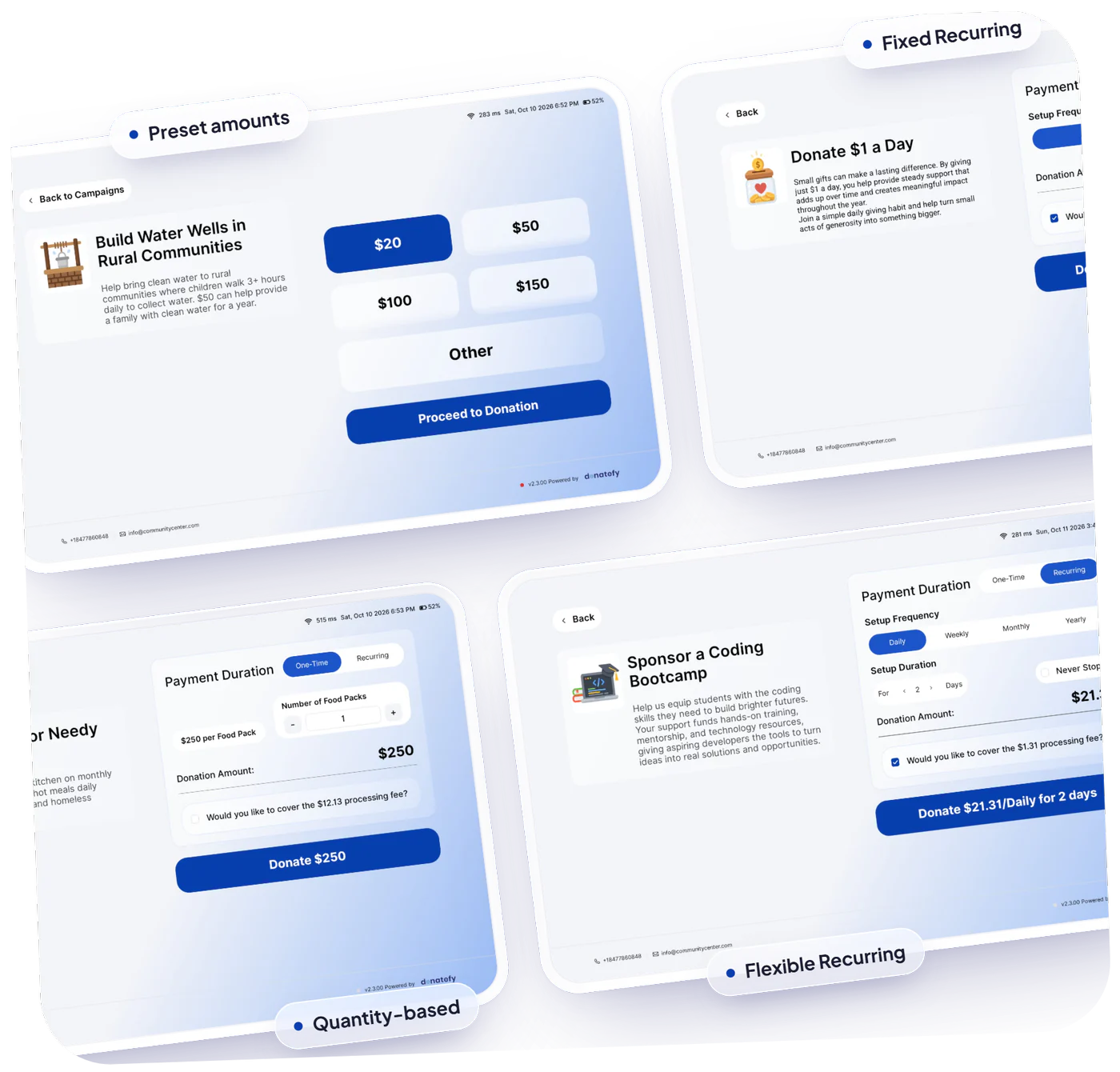
A worshipper moved by a khutbah or a Ramadan appeal can turn one gift into regular sadaqah before leaving the building. At the kiosk they choose a frequency and how long it runs, confirm with a card tap, and manage the plan later in the Donor Portal.
- Start a plan at the kiosk, on a handheld, or online
- Donors manage their own plans, with no calls to the office
- Predictable support for the masjid's running costs
Wall kiosk, floor kiosk, or handheld for your masjid
Every device runs the same campaigns and records to the same ledger. Choose by your floor plan and by where people give.
WM-22, $700
A 22-inch touchscreen as a permanent wall installation that uses no floor space. Suits a narrow lobby or the wall by the shoe racks. See the WM-22
FS-22, $1,000
A floor-standing kiosk on a rolling base, with battery backup for up to 8 hours. Suits a large lobby, or moving between the lobby and the hall. See the FS-22
Handheld readers, $349
The Stripe Reader S700 and Stripe Reader S710, made by Stripe and provisioned by Donatefy, take tap, chip, and swipe with PIN entry and arrive with your campaigns loaded. The S710 adds 4G LTE for outdoor prayers. See the readers
Weighing a kiosk against a handheld or the Mobile App? Compare every option in in-person fundraising.
Masjid kiosk prices and fees
Published prices, hardware your masjid owns, and fees you can see line by line in your own Stripe account.
Hardware, bought once
Your masjid pays once for each kiosk or reader and owns it; device prices are listed above. Every device we sell carries Donatefy's one-year warranty and a 45-day money-back pilot.
A plan that fits
Online giving starts on Free at $0 a month. Devices activate on Starter at $49 a month, and Growth at $149 a month covers up to 5 devices. Prepaying Growth annually? Ask about the Launch Kit, which bundles a wall-mounted kiosk with your first year.
Processing and fee coverage
Payment processing by Stripe comes out of each payment in your own Stripe account at the rates Stripe publishes, separate from the Donatefy platform fee. Donors can add both fees to their gift, so the masjid keeps 100% of it.
72% of donors on Donatefy choose to cover the fees. Source: Donatefy platform data. Coverage is always the donor's choice, and results vary by organization. See every plan and device on the pricing page.
Receipts and records your treasurer can trust
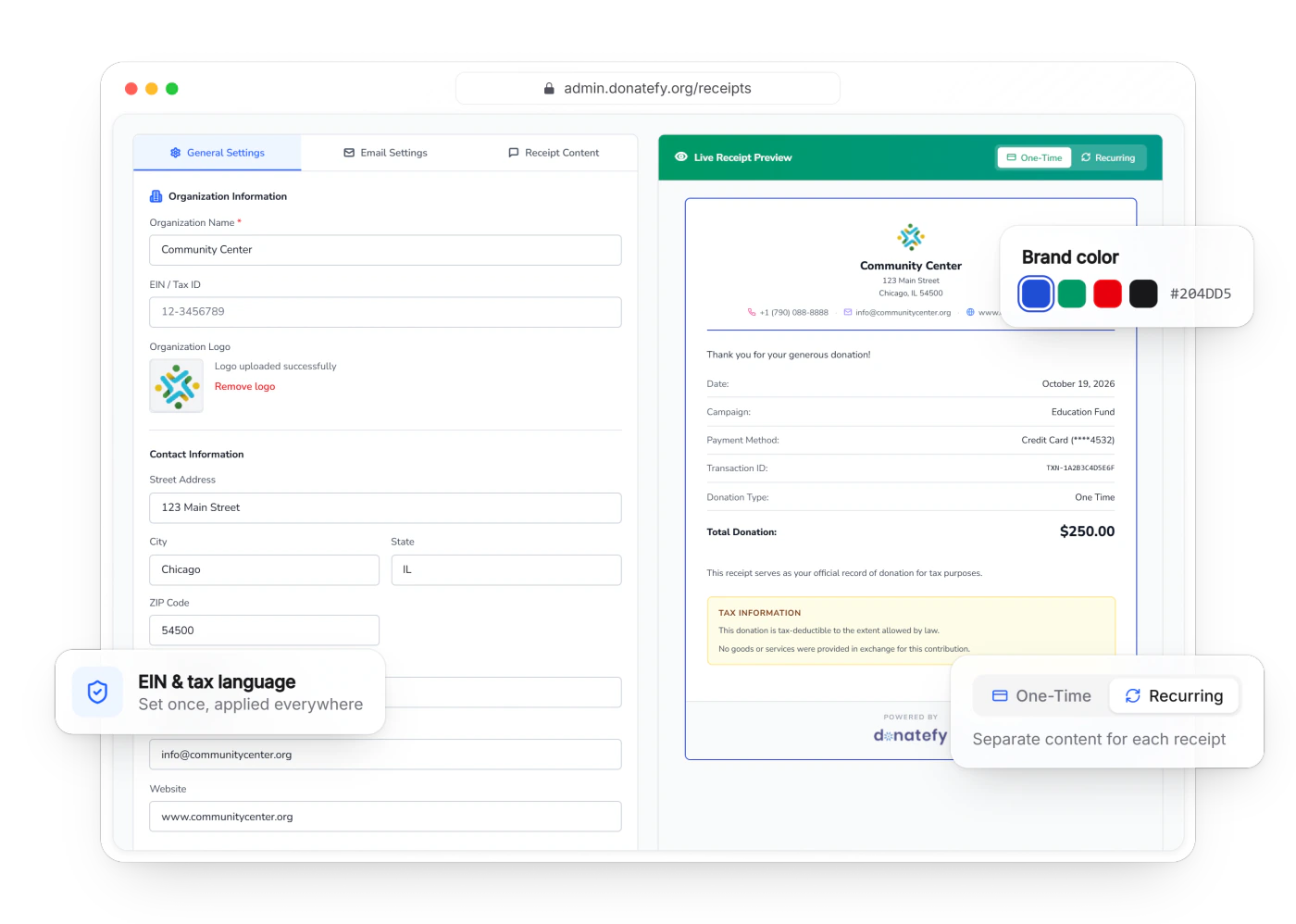
Every receipt carries your masjid's name, EIN, and tax language, on every channel. Cash and checks from the donation boxes go into the same ledger as card gifts, so each donor has one giving history. With the QuickBooks Online add-on ($20 a month), donations post pre-coded per fund, and donors download their own receipts in the Donor Portal, with year-end summaries on paid plans.
When the board asks who gave during last year's Ramadan appeal, the answer is one search away. Read how donor management cuts admin work.
Mosque donation kiosk questions
Planning the move to cashless? Read cashless giving for congregations and how to choose a donation kiosk.
Is a subscription required for a masjid donation kiosk?
Can donors tap a card or phone?
Are receipts sent automatically?
Can the kiosk show several funds at once?
Can we keep zakat separate from the general fund?
Can donors give monthly sadaqah at the kiosk?
Can people give from the prayer hall or from home?
What happens if the Wi-Fi drops?
How is the kiosk installed?
What warranty and support come with it?
Can we move a kiosk between buildings?
Bring your funds and your floor plan to a demo.
We will help you set up zakat, sadaqah, and building campaigns and pick the right spot for the kiosk.